Draft Bench

A writing workflow for Obsidian.
No Obsidian yet? Get it here — it's free.
Draft Bench is a writing plugin for novelists working in Obsidian. It manages the manuscript spine — projects, chapters, scenes, sub-scenes, drafts, and compile — as first-class note types in your vault, using the frontmatter conventions Obsidian writers already know.
The plugin stays narrow on purpose. Plot grids, character databases, beat-sheet templates, and pacing analytics live elsewhere. Draft Bench handles the structural editing of a manuscript: organizing scenes into chapters, snapshotting drafts at any point, and compiling the finished work to Markdown, PDF, ODT, or DOCX.
What it does#
- Projects, chapters, scenes, sub-scenes, drafts, and compile presets are notes. Every Draft Bench artifact is a regular markdown file with
dbench-frontmatter properties. A vault opened without the plugin still reads cleanly: scenes are notes, drafts are notes, presets are notes. Nothing is locked behind plugin-only state. - Manuscript view, two ways to read. A workspace pane with a List / Continuous tab strip. List shows chapters and scenes for a selected project in
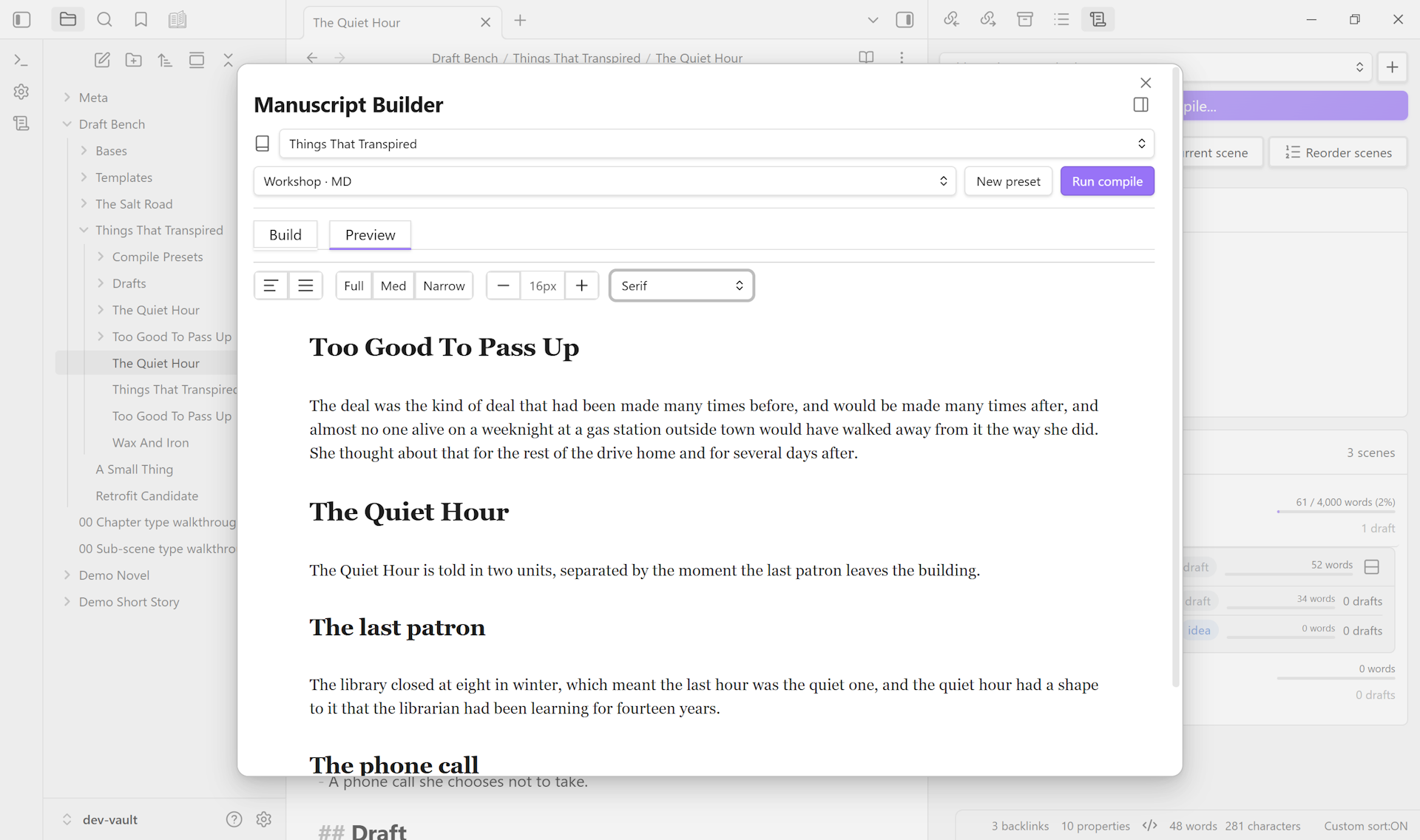
dbench-order, with word-count rollups, inline status, draft counts, and reorder modals. Continuous (added in 0.4.0) renders the entire manuscript as one scrollable read-only document — chapters, scenes, sub-scenes, full bodies — with click-heading-to-source and live updates as you write. Switch modes in the leaf header; preference persists per project. - Manuscript Builder. A compile surface where you tune presets and run compile, with a Build tab (form fields for metadata, inclusion filters, output format, content handling) and a Preview tab that renders the current preset’s output as continuous read-only prose. Opens as a focused modal by default; dock to a workspace tab to leave Preview pinned next to a scene you’re editing — Preview re-renders as you save (debounced).
- Drafts as a first-class type. Snapshots of scenes, chapters, or single-scene projects, stored in a configurable
Drafts/folder. Capture the state of the work at any moment — before a major revision, after a workshop session, when a beat finally lands. Drafts are notes, so they’re searchable, taggable, and Bases-queryable like everything else. - Scrivener 3 import. A multi-step wizard reads a
.scrivbundle from inside your vault and produces a fresh Draft Bench project — chapters, scenes, sub-scenes, drafts (optional), inspector content (synopses, notes, comments, footnotes, keywords), and custom metadata all carry across, with every mapping reviewed in a Preview step before any file gets written. Cross-platform — works on every OS Draft Bench supports. Shipped in 0.5.0. - Compile presets are notes too. A preset is a
dbench-type: compile-presetnote in your vault, with content-handling rules (frontmatter strip, heading scope, footnote renumbering, embed handling, dinkus normalization) editable in the Properties panel or the Compile tab. Multiple presets per project — one for workshop submission, one for the agent draft, one for the final manuscript file. - Bidirectional linking with integrity service. Stable IDs, plugin-maintained reverse arrays, live sync on vault events, and a batch-repair UI for the cases that drift. SNAKE_CASE issue codes so the same problem reads the same way every time.
- Bases-native discovery. Starter
.baseviews for projects, scenes, and drafts. Filter, group, and surface your manuscript with the same Bases setup you use for everything else in your vault. - Theme-respectful styling. Class hooks and minimum defaults, opt-in via Style Settings. The plugin doesn’t impose chrome on writers who customize their vault’s appearance.
See it in action#
Five short loops on the features page walk through new projects, the Manuscript view, versioned drafts, compile, and the integrity service — captured from a real vault.
Where it sits#
Draft Bench is one of several Obsidian writing plugins. The closest spiritual ancestor is Longform; the plugin’s Drafts/ and compile concepts owe a real debt to Longform’s prior art. The closest contemporary is StoryLine, a much broader Scrivener-in-Obsidian that handles plotting, characters, locations, timelines, and analytics in addition to the manuscript.
Draft Bench’s scope is deliberately smaller. The narrative spine, well, and nothing else. Auxiliary content — characters, locations, research notes — stays user-managed in plain markdown, or moves to the sibling Charted Roots plugin which owns world-building. Two focused plugins, one shared vault.
For a longer comparison, see How Draft Bench compares.
Status#
The current release is 0.6.4 (2026-05-16). The V1 feature set has shipped and matured across the 0.1.x through 0.6.x releases, with marquee additions including the Scrivener 3 project importer, the Manuscript view Continuous mode, the scene-archive workflow, mobile support, and the dockable Manuscript Builder workspace leaf. For curated user-facing highlights see the Changelog; for the full per-release log, see the wiki Release History or GitHub Releases. Install from the Obsidian community-plugin directory (Settings -> Community plugins -> Browse -> “Draft Bench”), or via BRAT by adding banisterious/obsidian-draft-bench as a beta plugin for early access to pre-release builds.
What’s in the plugin today:
- Project, chapter, scene, sub-scene, draft, and compile-preset note types
- Manuscript view with List / Continuous tabs: chapter and scene cards with word-count rollups in List mode; full-manuscript scrollable read-through with click-heading-to-source in Continuous mode (0.4.0)
- Manuscript Builder with Build / Preview tabs, shared typography toolbar (text alignment, reading width, font size, font family), and a dockable workspace-leaf form with debounced file-save reactivity
- Drafts as snapshots of scenes, chapters, sub-scenes, or single-scene projects
- Scrivener 3 project import (0.5.0): 8-step wizard with hierarchy auto-detect, status / label / custom-metadata mapping, RTF body conversion, optional snapshot import, optional Research-folder import, and cross-document Scrivener-Link rewriting
- Compile to Markdown, PDF, ODT, and DOCX with per-preset content-handling overrides; the pipeline descends into sub-scenes in narrative order
- Bidirectional linking + integrity service with batch repair, length-mismatch convergence, and pairing-preserving splice
- Chapter-aware folder defaults: scenes nest under their chapter folder, sub-scenes nest under their scene folder
- Bases-native starter views for projects, scenes, and drafts
- Mobile-supported (Android verified; iOS / iPadOS untested) — vault-output compile works on mobile for all four formats
- Style Settings integration for opt-in theming
API and data shape may still adjust between minor versions during the 0.x phase; see the versioning policy.
Get involved#
- View the source on GitHub — public repo; star or watch for release notifications.
- Read the wiki — Getting Started, Manuscript Builder, FAQ, and the rest of the user docs.
- File an issue — bug reports and feature requests both welcome; the BRAT-public phase is when feedback shapes V1.x most.